
UP Family ID 2026 – Login, Registration, Update & Status Check (Complete Guide)
UP Family ID 2026 is a digital family identification initiative launched by the Government of Uttar Pradesh to simplify access to government services for every household in the state. Under the UP Family ID 2026 (Parivar Pehchan Patra) system, each family receives a unique identification number that stores complete family details in one secure database. This allows families to apply for welfare schemes, subsidies, and benefits without repeated paperwork. Using the official UP Family ID 2026 portal, citizens can register, log in, update family information, check application status, and download their Family ID from home.
How to Access Your Account
Citizens must log in to their account to access all available services. If you follow the right steps, logging in is quick and easy.
How to Log In to the Portal
1. Go to the official website : https://familyid.up.gov.in/portal/index.html
2. On the homepage, click on the Login button.
3. Type in your password and the phone number you used to sign up.
4. Enter the captcha code that shows up on the screen.
5. Click Login to get to your Family ID dashboard.
Key Security Tips to Stay Safe
🔐 Tips for Keeping Your Login Safe
- Use letters, numbers, and symbols to make a strong password.
- For better security, change your password often.
- Don’t click on links or messages that look fishy.
- Keep the mobile number you registered active so you can get OTP alerts.
- Don’t let your browser save things automatically on shared devices.
- Report any login activity that looks suspicious right away.
Documents Required for Registration
To complete your application, make sure you have the following documents ready:
Aadhaar cards of all family members
Mobile number of the head of the family
Address proof within Uttar Pradesh (e.g., electricity bill, water bill)
Income certificate (if applicable)
Caste certificate (if required)
Bank account details (for receiving government benefits)
Recent passport-sized photographs
Frequently Asked Questions (FAQs)
Is it necessary to have Aadhaar to register?
Yes, Aadhaar is needed to confirm the identity of the head of the family and other members when they sign up.
Is it free to sign up?
Yes, it costs nothing to apply. There are no fees on the official portal.
Is it possible to get a UP Family ID without a ration card?
Yes, you don’t have to have a ration card. You can apply with Aadhaar and other official papers.
How do I check the status online?
In addition, you can check the status of your application online. As a result, the portal clearly shows the current progress.
If my application has been closed down, what should I do?
If your application is turned down, find out why and fix the information before you apply again with the right papers.
Can one family get more than one Family ID?
No, each family only gets one UP Family ID so that their household record stays the same.
Is it necessary to have a UP Family ID to get government benefits in Uttar Pradesh?
Yes, more and more state welfare programs and subsidies require you to have a UP Family ID.
After I get my UP Family ID, can I download it?
Once your application is approved, you can log in to the portal and download your UP Family ID.
Does the UP Family ID last forever?
Yes, the Family ID is still valid, but you need to update it every time something about your family changes.
Registration - Step-by-Step Process
If your family doesn’t already have a Family ID, you can easily register for one online. Make sure that all of the information is entered correctly so that the application is not denied.
The UP Family ID (Ek Parivar Ek Pehchan) has become one of the most important parts of digital governance in Uttar Pradesh in 2026. This 12-digit unique identification number makes it easier for families to get state welfare benefits and subsidies. It also makes sure that these benefits and subsidies go directly to the families that need them.
This new guide gives a simple overview of the newest portal features, such as registering a new Family ID and keeping track of your application status in real time. Our step-by-step instructions make it easy to log in for the first time or update your family information on your phone or computer.
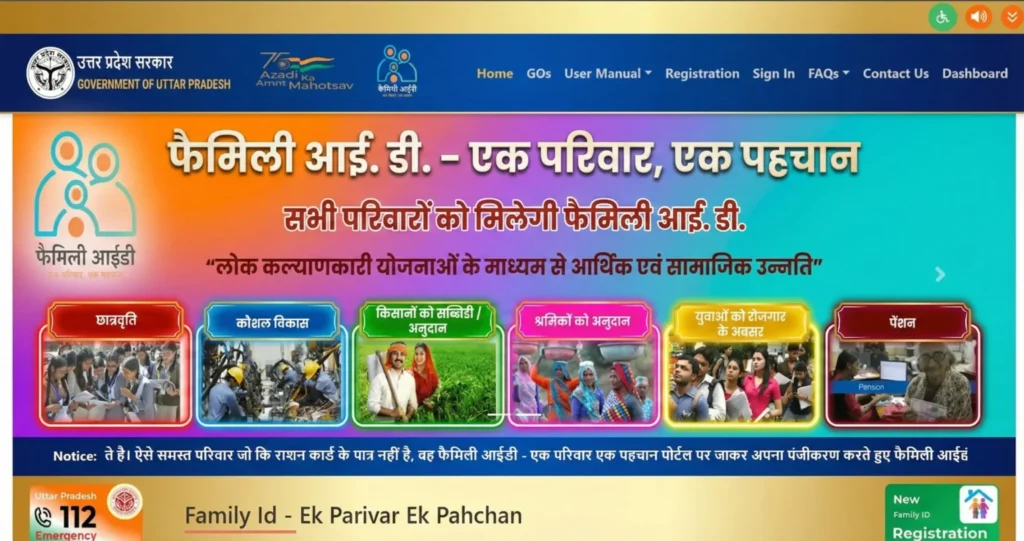
STEP NO. 1
How to Register for UP Family ID?
Go to the portal: https://familyid.up.gov.in/portal/index.html
STEP NO. 2
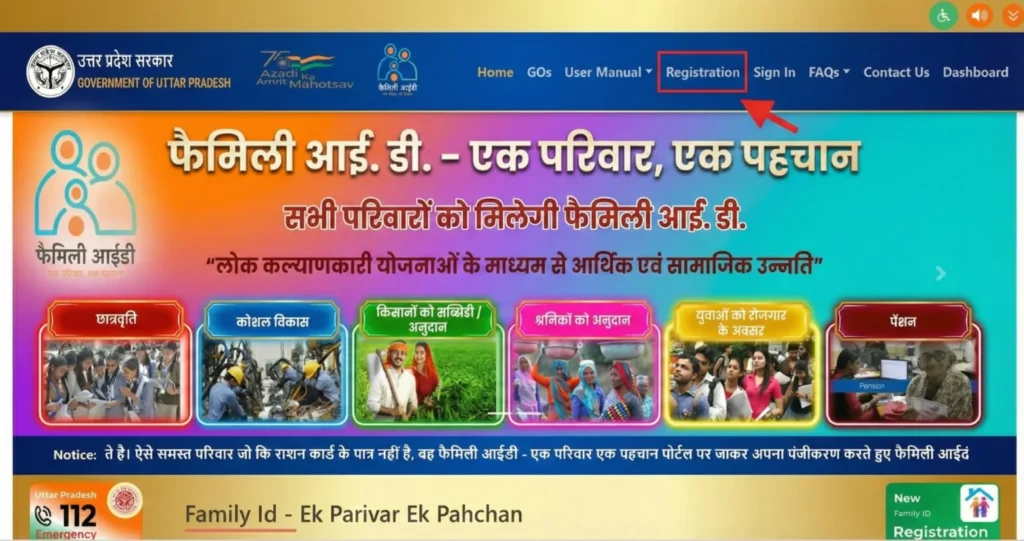
Click on New Registration
How to Register a New Family: Click on the New Registration Option on the Portal
STEP NO. 3
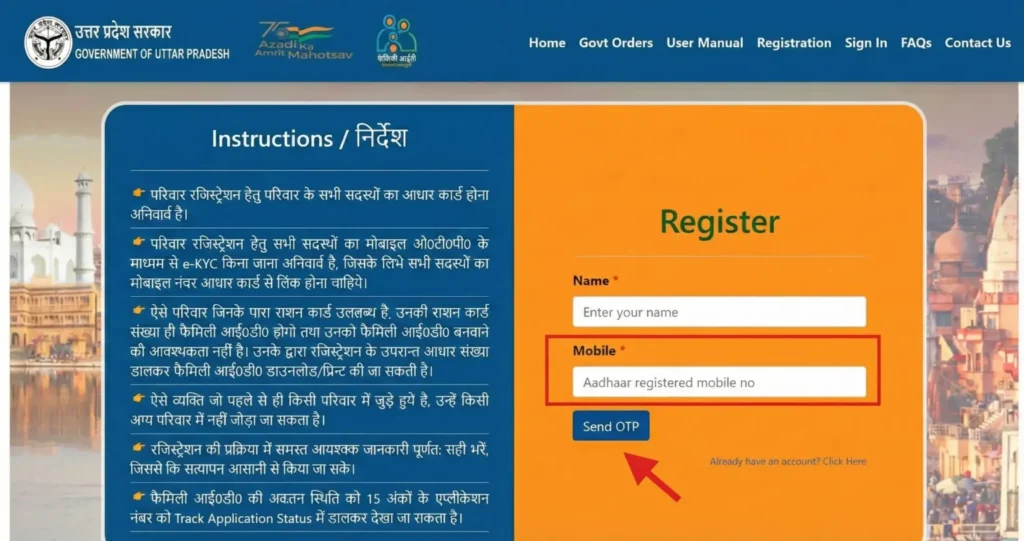
Enter Mobile Number
Provide an active mobile number.
You will receive an OTP for verification.
STEP NO. 4
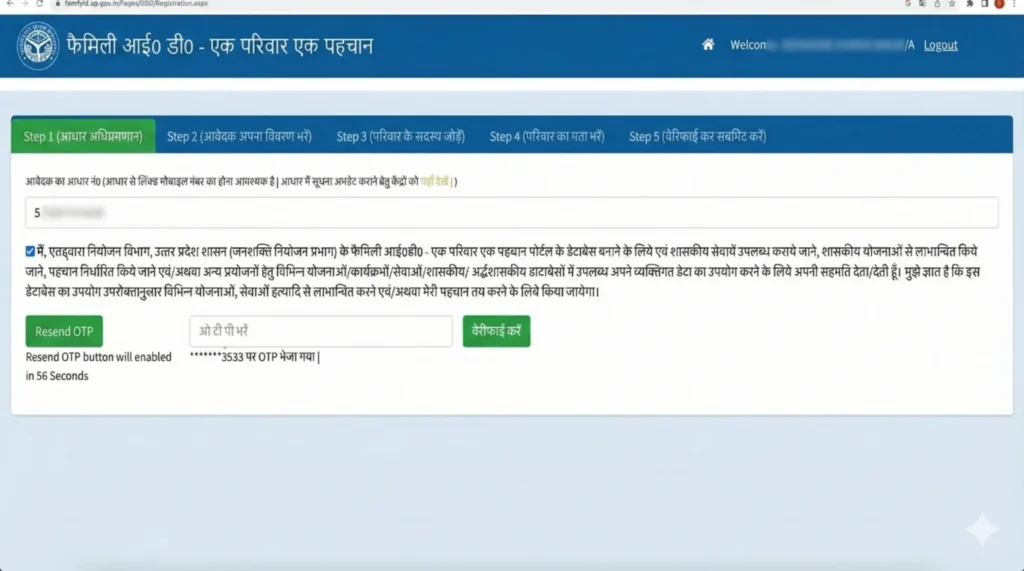
Verify OTP
Enter the OTP sent to your mobile number to continue.
STEP NO. 5
Put in the Aadhaar number of the head of the family.
Fill in the required field with the head of the family’s Aadhaar number. The system will use Aadhaar-based verification to automatically get basic personal information. This will help make sure that the information is correct and speed up the registration process.
STEP NO. 6
Fill in all the information about your family.
Fill out the portal with the correct information for each family member. Check that all the information is correct so that you don’t have to wait or be turned down. You need to give the following information:
- Complete name of the family member
- Sex
- Date of birth
- How you get along with the head of the family
- Aadhaar number
- Level of education
- Job
- Your mobile number (if you have one)
- Any other information that the system needs
STEP NO. 7
Upload the Documents You Need
To finish your application, upload clear, scanned copies of the documents you need. Check that all of your files are readable and correct so that they don’t get rejected. The documents that are needed are:
- Every family member needs an Aadhaar card.
- Proof of address, like a water bill, electricity bill, or similar document
- Recent photos that are the size of a passport
- Income certificate (if needed)
- Caste certificate (if needed)
STEP NO. 8
Review & Submit
Review All Details Carefully & Submit Your Application
STEP NO. 9
Save Application number
After successful submission, you will receive an application number. Keep it safely for future reference and status tracking.
Update – Add, Remove or Edit Details
Families may need to change their UP Family ID records if someone in the family dies, is born, moves, or makes a mistake in their personal information. You can easily change all of this information online through the official portal.
How to Update Family Details in Portal
-
Log in to the UP Family ID portal using your registered mobile number.
-
In your dashboard, click on “Update Family Details.”
-
Select the type of update you want to make (e.g., birth, death, address change, or information correction).
Available Options to Update Family Details
- Add New Member: For babies or family members who just got married.
- Remove Member: If a family member dies or moves away.
- Update Personal Information: For changes in your name, education, or job.
- Change of Address: When the family moves to a new home.
- Update Mobile Number: If the head of the family changes their phone number.
- Update your bank information so that government benefits (DBT) are credited correctly.
Update: How to Add, Remove, or Edit Family Details
Families may need to update their UP Family ID records due to changes such as birth or death.
In such cases, all details can be updated online through the portal.
To avoid issues, information should always be kept accurate.
After Selecting the Update Type
-
Fill in all the required information accurately.
-
Upload the necessary supporting documents, such as birth/death certificates, address proof, or other relevant files.
-
Submit your update request and verify your submission using the OTP sent to your registered mobile number.
Once you send in your request for an update, you will get a reference number. Keep it safe so you can check the status of your request online.
Track Your Application Status Easily
You can check the status of your UP Family ID application or request an update online at any time.
Steps to Check Status
Go to the official UP Family ID website at https://familyid.up.gov.in/portal/index.html.
On the homepage, click “Track Application.”
Type in your application number or the mobile number you used to Sign up.
If necessary, give more information, like your date of birth.
Click “Submit” to see how your application is doing right now.
What Your Status Can Indicate
-
Approved: Your UP Family ID has been successfully processed and is ready for download.
-
Rejected: Your application was not accepted. Check the reason, correct any errors, and apply again.
-
Processing: Your application is currently under review by the authorities.
-
Pending Verification: Additional verification is required; you may need to wait or upload missing documents.
Benefits of (Parivar Pehchan Patra)
There are many benefits to having a UP Family ID for families in Uttar Pradesh:
Single Database: Keeps all of a family’s information in one place.
No More Paperwork: You can use several government programs without having to send in the same documents over and over.
Faster Benefits: Makes it easy to check if someone is eligible for welfare programs.
Transparency: Makes it clear what benefits each family member gets.
Digital Access: You can get to all services online, so you don’t have to go in person as often.
Direct Benefit Transfer (DBT) makes sure that scheme funds go directly to the bank accounts of the people who are supposed to get them.
Security Tips for Using the Portal
Only access the official website: To get to the portal, always go to https://familyid.up.gov.in.
Keep your confidential data safe: Don’t give anyone your OTP, password, or other private information.
Change your password often: Change your password every now and then to make your account safer.
Log Out on Public Devices: When using a public or shared computer, always log out.
Keep your information up to date: Whenever there are changes, you should quickly update your Family ID information.
Report Suspicious Activity: If you see anything strange happening with your account, call the official helpline right away.
Important Links
| Purpose | Link |
| Official Family ID Portal | https://familyid.up.gov.in/portal/index.html |
| UP CSC Portal | https://upcsc.in |
| UP Jan Seva Portal | https://jansunwai.up.nic.in |
| UP e-District Services | https://edistrict.up.gov.in |
| Assistance | Visit nearest Jan Seva Kendra |